
Switching account views in Azupay Dashboard
To make it easier to access and manage a group of accounts, we’ve introduced updated the account switcher function in the Azupay Dashboard. If your business has sub-accounts, you can now move between your main account, its sub-accounts and any sub-accounts nested below those, without signing in again.
Sub-accounts sit in a hierarchy below your main account, which is the account you signed in to. For example, Example Group might have sub-accounts for Example Retail and Example Online, and Example Retail might have its own sub-account for each store. Sub-accounts are created with the Clients API.
Select your initials in the top bar to open the switcher. Each account shows its trading name and legal entity name, and a number tells you how many sub-accounts sit directly below it. Select an account name to switch to it. That account’s data loads and you stay signed in.
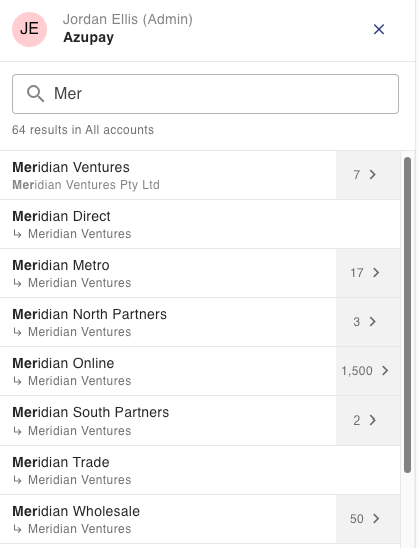
Want to look around first? Select the arrow next to an account to browse its sub-accounts without leaving the account you’re in. The breadcrumb takes you back up a level at a time. You can also search by trading name, legal entity name or client ID, and return to your main account in one step.
The switcher also shows the Client ID for the account you’re working in, with a copy icon. It’s the same clientId you use in API requests, so it’s handy when you raise a support request.
You only see the accounts you’re authorised to access. New or updated accounts can take around 10 minutes to appear.
🔀 Learn more about switching between accounts in the Azupay dashboard