
Receive PayID Payments
PayID payments
Use PayID payments in the Pay by Bank App when you want to receive real-time account-to-account payments through a generated PayID and hosted checkout experience.
Single exact payment for a single transaction.
Multiple payments toward a target amount.
Flexible customer-linked payments of any amount.
The same customer PayID reused across billing cycles.
To use the Pay by Bank app, use the paymentRequest API. Depending on your provided payload, you will have one of the above "Request" types.
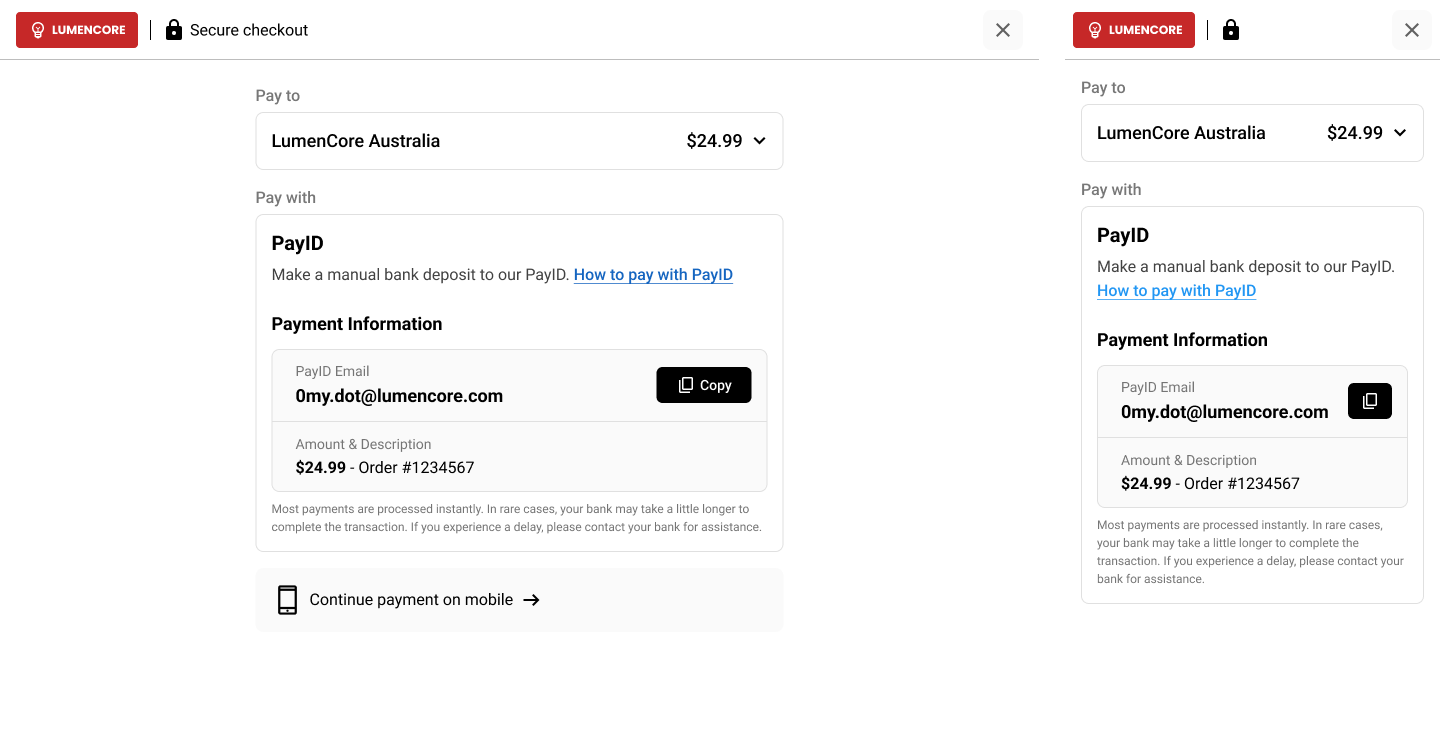
Choose the right PayID model
| Payment model | Best for | Key behaviour |
|---|---|---|
| Dynamic Request | One-off purchases, invoices, bookings | Accepts a single exact payment, then closes |
| Multi-payment Request | Instalments or split payments | Accepts multiple payments until the target amount is reached |
| Open Request | Wallet top-ups and account funding | Accepts multiple payments of any amount over time |
| Reusable Request | Periodic billing and repeat customer payments | Reuses the same customer-specific PayID when a new payment is due |
Payment patterns
Dynamic Request
A Dynamic PayID is a short-lived PayID generated for a single transaction.
Best for: one-off purchases, invoices, bookings, and transaction-based payments where you want a single payment matched to a single event.
What to expect:
- a unique PayID is generated in real time
- the payer is prompted to pay the exact amount requested
- once paid, the PayID is deregistered
- duplicate or unintended follow-up payments are prevented
- set
amountin the Payment Request- do not set
multiPayment=true- do not provide a
payId
Multi-payment Request
A Multi-payment PayID allows multiple payments to be made toward a target amount.
Best for: instalments, split payments, or payment scenarios where the full amount may not be received in one transfer.
What to expect:
- the payer can make partial payments against the same PayID
- the checkout experience updates based on the cumulative amount received
- once the target amount has been reached, the PayID is deregistered
- if an overpayment occurs, the excess amount is automatically refunded
When
multiPayment=true, the PayTo option is not available for that payment request.
- set
amountin the Payment Request- set
multiPayment=true- do not provide a
payId
Open Request
An Open PayID is a reusable PayID that can accept multiple payments of any amount over time.
Best for: wallet top-ups, account funding, stored-value balances, and customer-linked payment flows.
What to expect:
- each customer can be assigned their own PayID
- customers can pay any amount
- the PayID can remain available over an extended period
- customers can save the PayID in their banking app for repeat use
Encourage customers to save their PayID in their banking app for faster repeat payments.
- set
multiPayment=true- leave
expiryTimeempty, or set a long-dated expiry- optionally provide a meaningful
payIdfor the customer, such as a customer number or recognisable identifier
Reusable Request
A reusable customer PayID is a customer-specific PayID that you reactivate when a new payment is due.
Best for: periodic billing, utilities, account servicing, and repeat customer payment requests.
What to expect:
- the customer pays to the same PayID each time a bill is issued
- each Payment Request can carry a new amount and payment description
- once the requested amount is received, the PayID is deregistered
- when the next payment is due, you create a new Payment Request using the same
payId
- set
amount- provide a
payIdfor the customer and retain it in your system- leave
expiryTimeempty, or set a long-dated expiry- always use the same
payIdfor the same customer when creating future Payment Requests
Use the checkoutUrl
checkoutUrlOnce your Payment Request has been created, use the returned checkoutUrl to direct the payer into the hosted Pay by Bank App experience.
The checkout experience will:
- present the payment details to the payer
- guide them through the PayID payment flow
- reflect the payment status as funds are received
- show the correct outcome for successful, partial, expired, or incorrect payments depending on the payment configuration
Please note that Virtual Accounts solution is not visible within the hosted Pay by Bank experience. The Virtual bank details are only returned via API.
Updated 5 months ago