
PaymentRequest API
The PaymentRequest API is used to receive payments from your customers.
Overview
The PaymentRequest API allows you to request others to pay you either using one of our Pay By Bank UX Apps, which is our recommended orchestration, or if you find your use case does not suit any of our UX Apps you can build, optimise and maintain your own using our API.
Our PaymentRequest Apps use the PaymentRequest API to generate a Pay By Bank UX URL that you can easily integrate in your payment page to receive payments from your customers. Our PaymentRequest App will return a URL to invoke the UX to ensure optimum user experience for your customers and reduce your development time. For more information, see Pay by Bank UX solution.
If none of our Payment Request Apps or configurations work for your use case, then you can integrate with our API alone to receive payments.
Whether you use our Pay By Bank UX Apps or build your own, you will need to understand our PaymentRequest API. The Azupay Rest API has an entity called PaymentRequest.
API References
| API | Description | Method |
|---|---|---|
| Create a Payment Request | Allows you to create a PaymentRequest. Once created, your customer can make a payment to it. You can poll for the Payment Request Status using the Get a Payment Request API to determine whether or not the required payment was made by the customer, or subscribe to webhooks for the object. | POST |
| Get a Payment Request | Allows you to return the current status of a specific Payment Request. Use the contents of the response body to determine whether the customer has made their payment. | GET |
| Delete a Payment Request | Delete an existing payment request | DELETE |
| Refund a Payment Request | Refund a previously settled PaymentRequest back to the customer's source of funding. Optionally supply the amount to refund. | POST |
| Search for Payment Requests | Search for Payment Requests by PayID, Client Transaction ID or for all transactions across a specific date range. | POST |
What is a PayID?
A PayID is an identifier in one of the following formats used to receive payments:
| Format | Description | Supported for PaymentRequests |
|---|---|---|
| A PayID associated with an email identifer in the format prefix@domain | Yes | |
| PHONE | A PayID associated with either a land line or mobile phone number, prefixed with an area code. For example `+61-400000000 | No |
| ABN | A PayID associated with an Australian Business Number | No |
| ORG | A PayID associated with an Organisation name | No |
Azupay supports email based PayID registrations for PaymentRequests, as this allows us to ensure the PayID is unique to the customer or transaction by using your business domain as the domain suffix on the PayID, and by setting a prefix unique to the PaymentRequest.
What is a BSB and Account Number?
BSB stands for Bank State Branch. Its a 6 digit number used in Australia to identify which bank and which branch your account is held at. It typically looks like this: 123-456. An Account Number is a unique number usually 6-10 digits that identifies a specific account held within that branch. These two identifiers can be used to make payments to any bank account.
What is PayTo?
PayTo allows bank account holders to securely authorise businesses to debit their bank accounts in real-time. A PayTo Agreement can be established using PayID or BSB + Account Number.
Types of PaymentRequests
| PaymentRequest Type | Use Cases | Payment Request Behaviour | Configuration Characteristics |
|---|---|---|---|
| Dynamic PaymentRequest | Receive a single payment. Use Case:
|
|
|
| Static PaymentRequest | Receive multiple payments. Use Case:
|
|
|
| Fixed Amount Static PaymentRequest | Receive multiple payments , up to a specified amount. Use Case:
|
|
|
| Fixed Time Static PaymentRequest | Receive multiple payments up to a point in time in the future. Use Case:
|
|
|
| Fixed Time and Amount Static Payment Request | This is a simply a combination of the two discussed earlier |
Key configurations for PaymentRequests
The key units of configuration to set these different request types include the following fields on PaymentRequests:
| Variable | Description |
|---|---|
PaymentRequest.multiPayment | Used to configure if the PaymentRequest can receive multiple payments against it. Is set as a boolean as either true or false. Defaults to false if not provided. |
PaymentRequest.paymentAmount | Used to set the amount of the payment allowed.
|
PaymentRequest.paymentExpiryDatetime | Used to set an expiry date time for a PaymentRequest. When this time is reached, if the PaymentRequest is in a WAITING status, the PaymentRequest will be updated to an EXPIREDstatus, and no longer be available to receive payments. |
PaymentRequest.payID | By default, Azupay will generate the PayID for you by randomly generating the portion before the @ character. Azupay will use the domain specified during on-boarding. |
PaymentRequest.suggestedPayerDetails | When using PaymentRequest UX Apps, you can optionally relay your payer's PayID or BSB + Account Number from your own customer details database. Relaying this reduces the number of steps required to complete the payment. |
PaymentRequest.enableVirtualAccount | Setting this flag to true causes Azupay to allocate a Virtual BSB+Account Number for your customers to pay to. |
Let's discuss these in the most basic form first and then take a look at how you can tweak their behaviour with special features that are described later on in this guide.
Setting up a PaymentRequest to receive payments
Dynamic PaymentRequest
This type of PaymentRequest can only receive a single payment and is useful in situations where your customers make a one-off purchase of goods, or pay a single invoice. The main characteristics of this type of PaymentRequest are:
- Can only receive a single payment.
- Once completed, the PaymentRequest's status is changed to
COMPLETE. - Can only be used with PayID and PayTo Agreements
- PayTo Agreements can only be used in conjunction with Azupay's PaymentRequest UX. If you wish to use PayTo with your own UX, please use the PaymentAgreement and PaymentInitiation APIs directly.
To create a Dynamic PaymentRequest, issue the following API call:
POST https://api.azupay.com.au/v1/paymentRequest
Authorization: SECR_MYBUSINESSID_nR2duCGXlqWSuYJF
Content-Type: application/json{
"PaymentRequest": {
"clientId": "MYBUSINESSID",
"clientTransactionId": "INV-0000001-1",
"paymentAmount": 32.12,
"paymentDescription": "Client invoice numner INV-0000001"
}
}This is a very simple request message. Now let's have a look at what you submitted:
clientId: your unique client identifier that we provide you during onboarding.clientTransactionId: a unique identifier for your business that does not repeat. If you send the sameclientTransactionIdin another request the system will not create a new one, but will return the status of the existing one. This serves as a duplicate check in case your HTTP client retries the same message. So it is a good practice to use a globally unique identifier (GUID) or append an extra counter to your invoice identifier in case you need to recreate the PaymentRequest.paymentAmount: the amount you expect to receive. If a different amount is received, Azupay will return that payment immediately.paymentDescription: This is used to provide additional context in various places to facilitate the transaction. For example, the PayID is registered with the value in this field. This causes the description to appear in online banking apps for example. We may also use it in other places such as a PaymentRequest UX or in transaction reports.
Once you submit this request you will receive a response like the following.
HTTP/1.1 200 OK
Date: Wed, 21 Apr 2021 03:36:47 GMT
Content-Type: application/json{
"PaymentRequest": {
"clientId": "MYBUSINESSID",
"clientTransactionId": "INV-0000001-1",
"paymentAmount": 32.12,
"paymentDescription": "Client invoice numner INV-0000001",
"payID": "[email protected]"
},
"PaymentRequestStatus": {
"paymentRequestId": "a050551479f625c066b559da28fee33c",
"status": "WAITING",
"createdDateTime": "2021-04-21T03:36:45.115Z"
}
}You can see there are some additional fields on the PaymentRequest as well as a new entity called PaymentRequestStatus.
For the PaymentRequest:
payID: the unique PayID generated for this transaction. Note it uses a domainmybusiness.com. This domain is configured for your business during onboarding. As part of on-boarding we validate you have ownership of the domain.
The returned PaymentRequestStatus gives information about the newly created PaymentRequest. These are the fields:
paymentRequestId: an identifier generated by Azupay. Used to reference the PaymentRequest in subsequent operations such asgetPaymentRequestandrefundPaymentRequest. It is a good idea to store this identifier in your database so that you can enquire about the status later.status: the status. Given you have just created it, its status isWAITINGas in waiting for your customer to complete the payment. See the PaymentRequest Statuses at bottom of this page for more information about the status.
Dynamic PaymentRequest Lifecycle
- Once the PaymentRequest is in
WAITINGstatus, the customer can go to their banking app and complete the payment. - Once paid, the PaymentRequest will update to a
COMPLETEstatus. - If the PaymentRequest expires before it is completed, it will update to an
EXPIREDstatus. - If refunded once completed, it will progress from
RETURN_IN_PROGRESSto either aRETURN_COMPLETEorRETURN_FAILEDstatus depending on if the refund was successful or not.
Additional Features
Time limiting
You can apply time based limits on your PaymentRequest by specifying a point in time in the future via paymentExpiryDatetimefield. This field is defaulted to a value from your client configuration unless overriden by api. You cannot have a Dynamic PaymentRequest with no time limit for payment.
Static PaymentRequest
This is a different type of PaymentRequest that supports your customers to make multiple payments over time. It can be useful in situations like a customer wallet where you create a PaymentRequest for each customer and they use the same PayID or BSB+Account Number repeatedly over time to top-up their account with you. For these transactions, a parent PaymentRequest is generated and individual payments against it are attached to a child PaymentRequest in a COMPLETED status at the time the payment is received.
A few different rules apply for Static PaymentRequests:
- The request must have the
multiPaymentfield set totrue - The status of the parent PaymentRequest will be
WAITINGas long as it's able to receive payments. - Payments against this PaymentRequest will generate a new PaymentRequest with a system generated
clientTransactionId, and will contain aparentPaymentRequestIdthat shares thepaymentRequestIdof the parent PaymentRequest generated with themultiPayment: truevalue. These PaymentRequests will be in aCOMPLETEstatus. - Notification webhooks will contain a
parentPaymentRequestIdthat corresponds to the parent PaymentRequest. Its important to have webhooks setup in order for you to learn about new payments made to this kind of PaymentRequest. See the webhooks for Multiple Payment PayID's section for more details. - Refunds are executed against the child PaymentRequests. Initially the status will be
RETURN_IN_PROGRESS, thenRETURN_COMPLETEorRETURN_FAILEDdepending on the outcome. - Here is a diagram summarising the aforementioned points:
graph TB
    subgraph "Parent PaymentRequest"
        Parent["PaymentRequest<br/>multiPayment: true<br/>status: WAITING<br/>paymentRequestId: PR001"]
    end

    subgraph "Child PaymentRequests (Generated on Payment)"
        Child1["Child PaymentRequest 1<br/>status: COMPLETE<br/>paymentRequestId: PR001-C1<br/>clientTransactionId: system-gen-001<br/>parentPaymentRequestId: PR001"]

        Child2["Child PaymentRequest 2<br/>status: COMPLETE<br/>paymentRequestId: PR001-C2<br/>clientTransactionId: system-gen-002<br/>parentPaymentRequestId: PR001"]

        Child3["Child PaymentRequest 3<br/>status: COMPLETE<br/>paymentRequestId: PR001-C3<br/>clientTransactionId: system-gen-003<br/>parentPaymentRequestId: PR001"]
    end

    subgraph "Webhooks"
        WH1["Webhook Notification 1<br/>parentPaymentRequestId: PR001"]
        WH2["Webhook Notification 2<br/>parentPaymentRequestId: PR001"]
        WH3["Webhook Notification 3<br/>parentPaymentRequestId: PR001"]
    end

    subgraph "Refunds (Against Child)"
        Refund1["Refund on PR001-C1<br/>status: RETURN_IN_PROGRESS<br/>→ RETURN_COMPLETE/RETURN_FAILED"]
    end

    Parent -->|"Payment 1 Received"| Child1
    Parent -->|"Payment 2 Received"| Child2
    Parent -->|"Payment 3 Received"| Child3

    Child1 -.->|"Triggers"| WH1
    Child2 -.->|"Triggers"| WH2
    Child3 -.->|"Triggers"| WH3

    Child1 -->|"Refund Against"| Refund1

    style Parent fill:#1e3a5f,stroke:#4a90e2,stroke-width:2px,color:#fff
    style Child1 fill:#1e4d2b,stroke:#4ade80,stroke-width:2px,color:#fff
    style Child2 fill:#1e4d2b,stroke:#4ade80,stroke-width:2px,color:#fff
    style Child3 fill:#1e4d2b,stroke:#4ade80,stroke-width:2px,color:#fff
    style WH1 fill:#5a4a1e,stroke:#fbbf24,stroke-width:2px,color:#fff
    style WH2 fill:#5a4a1e,stroke:#fbbf24,stroke-width:2px,color:#fff
    style WH3 fill:#5a4a1e,stroke:#fbbf24,stroke-width:2px,color:#fff
    style Refund1 fill:#4d1e1e,stroke:#f87171,stroke-width:2px,color:#fff
Additional Features
Time limiting
You can apply time-based limits on your PayID by specifying a point in time in the future via paymentExpiryDatetimefield. You can also omit this field and this will cause the PaymentRequest to remain active forever.
Amount limiting
You can apply limits to the amount paid to a PayID. Azupay will keep track of total amounts paid to date even if there are multiple partial payments and multiple partial refunds.
Virtual Account
A virtual account is an alternate way to collect payments from your customers. Our PaymentRequest API can create a BSB and Account Number that your customers can pay to. This is always in addition to a PayID. If you request this to be enabled and pass one additional field to the PaymentRequest API, you will receive the following additional fields in the API response's PaymentRequestStatus object:
virtualBsb: The BSB that can be used to pay for this payment request.virtualAccountNumber: The Account Number that can be used to pay for this payment request.
When enabling virtual accounts for the first time, in-flight Payment Requests will not have virtual accounts assigned to them. If you require in-flight Payment Requests to be enabled for virtual accounts, you will need to regenerate the PaymentRequest, either by deleting and creating it again, or calling the Create Payment Request API on an existing PayID to update it.
Note: Once a payment has been made to a payment request, to the specified payment request amount and the parent PaymentRequest status is COMPLETE then no further payments can be made to the virtual account BSB/account number. Additionally, if a PaymentRequest expires, then payments can no longer be made to the virtual account created for that PaymentRequest.
Enabling virtual account numbers for your payment requests
If you include
enableVirtualAccount = TRUEin the PaymentRequest API request body, then Azupay will return avirtualBsbandvirtualAccountNumberfor your customers to make payment to. If you includeenableVirtualAccount = FALSEin the PaymentRequest API request, this will lead to only the PayID being returned to you in the PaymentRequest response.If you have the virtual accounts feature enabled for you, the default behaviour for each payment request is
enableVirtualAccount = TRUE, even if you dont pass any value in this field when calling the PaymentRequest API.
PayID has many efficiencies you will miss if your customers use BSB and Account Number payments
Australia is familiar with BSB and Account Number payments, so your customers may feel more comfortable with them, but PayID is the future and massively reduces payment errors. Azupay strongly believes you will have a better experience, as will your customers, by adopting PayID. You will also reduce your manual processing if you do not enable BSB and Account Number payments.
Due to the inefficiencies of BSB and Account Number payments compared to our PayID only solutions and possible increases to the number of payment disputes raised by your customers, there are additional fees if you do enable BSB and Account Number payments.
Updating a PaymentRequest
You can change the conditions that apply to a PaymentRequest created previously by submitting a new PaymentRequest with the same payID but different clientTransactionId. This will cause the API to expire any existing PaymentRequest and create the new one.
For example, if you usually create a single PaymentRequest per payer, something like [email protected]. You would create a first PaymentRequest like the one below:
POST https://api.azupay.com.au/v1/paymentRequest
Authorization: SECR_MYBUSINESSID_myapikey
Content-Type: application/json{
"PaymentRequest": {
"clientId": "MYBUSINESSID",
"clientTransactionId": "INV-0000001",
"paymentAmount": 40.00,
"paymentDescription": "Monthly invoice INV-0000001 for client 12345",
"payID": "[email protected]",
"paymentExpiryDatetime": "<last day of September>"
}
}Now if its end of the month, your client hasn't paid for invoice INV-0000001 and you have generated a new invoice INV-0000002 with the remaining balance you can submit a new PaymentRequest that would reflect the latest state of their account. Something like this:
POST https://api.azupay.com.au/v1/paymentRequest
Authorization: SECR_MYBUSINESSID_myapikey
Content-Type: application/json{
"PaymentRequest": {
"clientId": "MYBUSINESSID",
"clientTransactionId": "INV-0000002",
"paymentAmount": 80.00,
"paymentDescription": "Monthly invoice INV-0000002 for client 12345",
"payID": "[email protected]",
"paymentExpiryDatetime": "<last day of October>"
}
}Note that the clientTransactionId has a different value. Now your client would have to pay $80 instead of $40 and would see an updated description for the PayID when they look it up on their online banking app. The new PaymentRequest will also have a new paymentRequestId, this will be returned to you in the response of the second call.
Incorrect payments
Sometimes your customer might submit a payment with an incorrect amount. Depending on whether it's to a Dynamic or Static, the behaviour will vary.
| Type of PayID | Dynamic PaymentRequest | Static PaymentRequest With Amount Set |
|---|---|---|
Less than paymentAmount | Azupay will return the funds to the payer and the PaymentRequest will remain in WAITING status. | Azupay will accept the payment and keep the PaymentRequest in WAITING status |
| Exact amount | Azupay will update the status of the PaymentRequest to COMPLETE | Azupay will update the status of the parent PaymentRequest to COMPLETE |
| Overpayment | Azupay will return the funds to the payer and the PaymentRequest will remain in WAITING status. | Azupay will accept the outstanding amount and refund the overpayment back to the payer. |
Cases of failed payment attempts are communicated to you via the PaymentRequestStatus.failedPaymentAttempts field:
"PaymentRequest": {...}
"PaymentRequestStatus": {
  ...
  "failedPaymentAttempts": [
    {
      "attemptDateTime": "2021-06-02T23:35:12.940Z",
      "attemptAmount": 30,
      "attemptFailureReason": "Incorrect Payment Amount"
    }
  ],
  "status": "WAITING"
}
With this information you can advise your customer to retry the payment with the correct amount.
Checking payment status
You can enquire on PaymentRequest status by calling the GET /v1/paymentRequest API. You can also consume webhooks when the payment arrives.
To enquire about the status of a PaymentRequest you can perform GET call using the paymentRequestId that was returned in the PaymentRequestStatus. The request will look like this:
GET https://api.azupay.com.au/v1/paymentRequest?id=a050551479f625c066b559da28fee33c
Authorization: SECR_MYBUSINESSID_myapikey
Content-Type: application/json
The status will be in WAITING until completed by the payer, when the status will become COMPLETE. Note that an Static PaymentRequest never reaches COMPLETE status, rather the individual payments received against it reach this status.
{
  "PaymentRequest": {
    "clientId": "MYBUSINESSID",
    "clientTransactionId": "INV-0000001-1",
    "paymentAmount": 32.12,
    "paymentDescription": "Client invoice numner INV-0000001",
    "payID": "[email protected]",
    "paymentExpiryDatetime": "2021-04-21T03:51:45.256Z"
  },
  "PaymentRequestStatus": {
    "paymentRequestId": "a050551479f625c066b559da28fee33c",
    "createdDateTime": "2021-04-21T03:36:45.115Z",
    "payerPaymentDescription": "paying for my goods and services",
    "status": "COMPLETE",
    "amountReceived": 32.12,
    "completedDatetime": "2021-04-22T05:07:54.025Z"
  }
}
There are additional fields returned besides the new status:
amountReceived: should be the same as thepaymentAmountcompletedDatetime: the timestamp when the payment was received by Azupay.
Refunds
Full refunds
Once you have received a payment, and it is in COMPLETE status you can do a full refund by performing an API call like the following, again using the paymentRequestId:
POST https://api.azupay.com.au/v1/paymentRequest/refund?id=a050551479f625c066b559da28fee33c
Authorization: SECR_MYBUSINESSID_myapikey
Content-Type: application/json
You will get a response like the following
{
  "PaymentRequest": {
    "clientId": "MYBUSINESSID",
    "clientTransactionId": "INV-0000001-1",
    "paymentAmount": 32.12,
    "paymentDescription": "Client invoice numner INV-0000001",
    "payID": "[email protected]",
    "paymentExpiryDatetime": "2021-04-21T03:51:45.256Z"
  },
  "PaymentRequestStatus": {
    "paymentRequestId": "a050551479f625c066b559da28fee33c",
    "createdDateTime": "2021-04-21T03:36:45.115Z",
    "payerPaymentDescription": "paying for my goods and services",
    "amountReceived": 32.12,
    "completedDatetime": "2021-04-22T05:07:54.025Z",
    "status": "RETURN_IN_PROGRESS",
    "refundInformation": {
      "availableBalance": "0.00",
      "requests": [
        {
          "refundTrigger": "REFUND_API",
          "createdDateTime": "2021-04-25T23:52:56.189Z",
          "nppTransactionId": "AZTPAU22XXXN20230419100000000000020",
          "status": "IN_PROGRESS",
          "amount": "501.00"
        }
      ]
    }
  }
}
The status of the PaymentRequest will go into RETURN_IN_PROGRESS which means it has been initiated but not completed yet.
After some time, and assuming you have enough liquidity with Azupay to perform the refund, you can enquire about the status for the PaymentRequest and see a change on the status to RETURN_COMPLETE indicating the refund has completed successfully. You will also receive a returnCompletedDatetime.
{
  "PaymentRequest": {
    ...
  },
  "PaymentRequestStatus": {
     ...
    "status": "RETURN_COMPLETE",
    "returnCompletedDatetime": "2021-04-25T23:52:58.189Z",
    "refundInformation": {
      "availableBalance": "0.00",
      "requests": [
        {
          "refundTrigger": "REFUND_API",
          "createdDateTime": "2021-04-25T23:52:56.189Z",
          "completedDateTime": "2021-04-25T23:52:58.189Z",
          "nppTransactionId": "AZTPAU22XXXN20230419100000000000020",
          "status": "COMPLETE",
          "amount": "501.00"
        }
      ]
    }
  }
}
Partial refunds
To do a partial refund you would submit a similar request than for full refund but adding a refundAmount query parameter to the request.
Say you have a completed PaymentRequest for $100 and you do a partial refund of $25 using a POST like the following.
POST https://{{api-host}}/v1/paymentRequest/refund?id=a050551479f625c066b559da28fee33c&refundAmount=25
Authorization: SECR_MYBUSINESSID_myapikey
Content-Type: application/json
Once the refund is completed, when you enquire on the PaymentRequest you will see a response like the one below.
{
  "PaymentRequest": {
    ...
  },
  "PaymentRequestStatus": {
    ...,
    "refundInformation": {
      "availableBalance": "75.00",
      "requests": [
        {
          "refundTrigger": "REFUND_API",
          "nppTransactionId": "AZTPAU22XXXN20230419100000000000020",
          "createdDateTime": "2021-04-22T06:40:25.198Z",
          "completedDatetime": "2021-04-23T05:42:09.373Z",
          "status": "COMPLETE",
          "amount": "25.00"
        }
      ]
    },
    "status": "RETURN_COMPLETE",
    "returnCompletedDatetime": "2021-04-23T05:42:09.373Z",
  }
}
The latest entry in the refundInformation object will contain the information about the partial refund.
Multiple Partial Refund BehaviourWe support multiple partial refunds up to the total amount received. Our system will prevent you from refunding more than you have received. Even if you attempt multiple partial refunds and even if your customer sends back partial payments in between, we will keep track of the balance and ensure you never send back more than you've received.
Expired Payment Request Refunds
PaymentRequests can be configured with an expiry time. For more information, see Time limiting payment requests.
If a payment is received after a PaymentRequest has expired, Azupay automatically initiates a return to the payer. You do not need to manually trigger a refund for this scenario. This behaviour is the same whether the payer used the PaymentRequest PayID or an assigned virtual account.
The status of the PaymentRequest will go into RETURN_IN_PROGRESS which means it has been initiated but not completed yet.
After some time, you will see a change on the status to RETURN_COMPLETE indicating the refund has completed successfully. You will also receive a returnCompletedDatetime.
Azupay records this as returnInitiator: AUTOMATIC, and the associated refund request uses refundTrigger: PAYMENT_VALIDATION.
Refund failure scenarios
Azupay will return unique failure codes for each different refund scenario where refunds are unsuccessful, so that merchants can determine and record the reason that a payment was nor successfully refunded.
Refer to table below for failure error codes pertaining to payment refund failures.
| Code | Reason |
|---|---|
| ERR0.03 | Refunds can only be done on COMPLETE, RETURN_COMPLETE or RETURN_FAILED payments |
| ERR0.05 | Missing ID |
| ERR0.06 | Refund amount value must be a number |
| ERR0.07 | Refunds cannot be done against PaymentRequest's with multiPayment set to true |
| ERR0.08 | Refunds can only be done on COMPLETE, RETURN_COMPLETE or RETURN_FAILED payments |
| ERR0.09 | Refund for this client can only be for the full amount |
| ERR0.10 | Refund amount must be less than or equal to original payment amount |
| ERR0.11 | Insufficient balance in the settlement account |
Deleting a PaymentRequest
What this solves
Deleting a PaymentRequest allows you to prevent payments against it. The associated PayID and Virtual Accounts (if enabled) will be de-activated.
When to use it
Use the Delete Payment Request endpoint when:
- The PayID is still in the
WAITINGstatus - You need to permanently remove a request to prevent further customer payment attempts
Behaviour
When a PaymentRequest is deleted:
- The PayID is de-registered immediately, including the Virtual Account (if enabled)
- If there were no payments made to the PayID, the PayID will not be searchable in the Azupay system
- If payments were made to the PayID, these will remain present in the Azupay system
- If you are using Azupay's Pay by Bank UX Solution, the URL will expire and will not be accessible to your customer
Example request
DELETE /v1/paymentRequest?id=e9d99c6434f34dfa54342b6fa9c79bf
Authorization: <api_key>
Accept: application/json
Successful response
204 No ContentSearch for PaymentRequests
The Payment Request Search API (POST /paymentRequest/search) allows you to retrieve PaymentRequests based on specific criteria.
PaymentRequestSearch API requests
The PaymentRequestSearch API endpoint provides several criteria you can search on PaymentRequests for by supplying them in the body of the API request.
Some of these values can be used together in a composite search. The allowed set of values are:
clientTransactionIdon its own (mutually exclusive with everything else).payIDon its own, orpayID+fromDate+toDate.clientBranchon its own, orclientBranch+fromDate+toDate.searchByDateTypeon its own (just switches sort order). Note that this will return all PaymentRequests. Providing a blank search will error.fromDate+toDate.fromDate+toDate+searchByDateType.
| Field | Description | Example Value | Single or Composite Search |
|---|---|---|---|
clientTransactionId | Unique Id for the PaymentRequest created by your system and supplied to us in your This field is used to prevent the creation of duplicated transactions in case of a message retry. | "clientTransactionId": "TX5346423452345345" | Single Value |
clientBranch | An optional label identifier you have provided to categorise the transaction when creating PaymentRequests. Useful if you use this field for metadata such as products or branches within your organisation for searching for all transactions associated with the label. | "clientBranch": "Automotive Loans" | Single Value |
fromDate | The report start date in ISO date/time string format in UTC based on the Note that | "fromDate": "2021-10-18T02:32:30.693Z" | Composite Search |
toDate | The report end date in ISO date/time string format in UTC based on the searchByDateType (if provided).Must be used with fromDate. | "toDate": "2021-10-18T02:32:30.693Z", | Composite Search |
searchByDateType | Defines if the search will be based on the creation or completion date time of the payment request. Default to When using
| "searchByDateType": "CREATED_DESC" | Single Value or Composite Search |
payID | The PayID associated with the PaymentRequest. This will be a parent PaymentRequest and all child payment requests for Static Payment Requests. | [email protected] | Single Value or Composite Search |
Example Use Case Requests
Searching for all payment requests within a specific date range on Completed Date
`// POST /paymentRequest/search
{
  "PaymentRequestSearch": {
    "fromDate": "2023-01-01T00:00:00.000Z",
    "toDate": "2023-01-31T23:59:59.999Z",
    "searchByDateType": "COMPLETED_DESC"
  }
}
Searching for all payment requests within a specific date range, filtered by PayId
`// POST /paymentRequest/search
{
  "PaymentRequestSearch": {
    "fromDate": "2023-01-01T00:00:00.000Z",
    "toDate": "2023-01-31T23:59:59.999Z",
		"payID": "[email protected]"
  }
}
Searching for all payment requests within a specific date range, filtered by Branch
`// POST /paymentRequest/search
{
  "PaymentRequestSearch": {
    "fromDate": "2023-01-01T00:00:00.000Z",
    "toDate": "2023-01-31T23:59:59.999Z",
		"clientBranch": "BRANCH1"
  }
}
Searching for a specific clientTransactionID payment request
`// POST /paymentRequest/search
{
  "PaymentRequestSearch": {
		"clientTransactionId": "TX5346423452345345"
  }
}
Pagination of Search Results
By default, our system will default to returning only 100 records for the period searched. If you need to search more transactions than this, you can use the query parameters available on the rest endpoint.
Note that the nextPageId value is only available on responses when the payload exceeds the available amount of records that can be returned in a single query, which is typically when the results would be greater than 1000 records.
These query parameters are numberOfRecords and nextPageId.
For example, let's say you call a list of all PaymentRequests over a large period of time such as in the following example, and want to return up to 10,000 records:
curl --request POST \
     --url 'https://<environment>/v1/paymentRequest/search?numberOfRecords=10000' \
     --header 'Authorization: <SECRET KEY>' \
     --header 'accept: application/json' \
     --header 'content-type: application/json' \
     --data '
{
  "PaymentRequestSearch": {
		"fromDate": "2025-01-01T00:00:00.000Z",
    "toDate": "2026-01-31T23:59:59.999Z",
    "searchByDateType": "CREATED_DESC"
  }
}
'
By default, our API will only ever return under 1,000 records in a single API request. The exact amount is typically above 900 and below 1000.
If the above query returned a data set to that exceeded 1,000 records, the returned value will include a page to the next set of results, and the response object will include a nextPageId value, and a recordCount of the amount of records returned in the current page.
{
  "records": [
    {
      "PaymentRequest": {
        ...
      }
    },
    ...
    {
      "PaymentRequest": {
        ...
      }
    }
  ],
  "nextPageId": "eyJwcmltYXJ5U2siOiJQYXltZW50UmVxdWVzdCIsInByaW1hcnlQayI6IjI3MTNlNGE2YWE0ZTM2NGI5ZTE1ZWZiZmI5ODZkMTcxIiwiR1NJNFBrIjoiYTIzMDQxZTk0OTliYWRiMzRiZDZkOTBhZjEyZjMzOTIjUGF5bWVudFJlcXVlc3QiLCJjcmVhdGVkRGF0ZXRpbWUiOiIyMDI1LTA3LTI4VDExOjI1OjE2Ljk4NFoifQ==",
  "recordCount": 940
}
If you need to access the next page of records, you can supply the nextPageId, and continue to iterate through the results, until you reach the last page, which will not include a nextPageId value.
This page can be accessed by supplying the nextPageId query parameter alongside the original request:
curl --request POST \
     --url 'https://<environment>/v1/paymentRequest/search?nextPageId=eyJwcmltYXJ5U2siOiJQYXltZW50UmVxdWVzdCIsInByaW1hcnlQayI6IjI3MTNlNGE2YWE0ZTM2NGI5ZTE1ZWZiZmI5ODZkMTcxIiwiR1NJNFBrIjoiYTIzMDQxZTk0OTliYWRiMzRiZDZkOTBhZjEyZjMzOTIjUGF5bWVudFJlcXVlc3QiLCJjcmVhdGVkRGF0ZXRpbWUiOiIyMDI1LTA3LTI4VDExOjI1OjE2Ljk4NFoifQ%3D%3D&numberOfRecords=10000' \
     --header 'Authorization: <SECRET KEY>' \
     --header 'accept: application/json' \
     --header 'content-type: application/json' \
     --data '
{
  "PaymentRequestSearch": {
    "searchByDateType": "CREATED_DESC"
  }
}
'
Additional Information
Advanced PaymentRequest customisation
Custom description
By default, the description that the payer sees on their banking application following entry of a PayID looks something like the following:
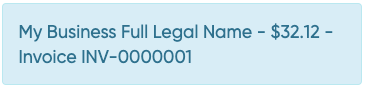
The entire description is a concatenation of your organisation name (My business full legal name), the amount ($32.12) and payment description (INV-0000001).
Where a Static PaymentRequest does not have an amount, the description will just omit amount, but the rest will be the same. It will look something like the following:
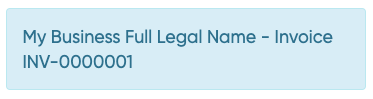
You can customise this text when creating the PaymentRequest like the following:
{
  "PaymentRequest": {
    ...
    "paymentAmount": 32.12,
    "paymentDescription": "Invoice INV-0000001",
    ...
  },
  ...
}
Note that the organisation name at the beginning corresponds to the full legal name that was provided during on-boarding. Sometimes your customers may not recognise your company's full legal name and it will be more appropriate to use your trading name. The next section shows how you can customise the organisation name for a particular PayID domain.
It is a requirement that the organisation name reflects the name your business is known by in the marketWe default to using your legal name and will need to review any other organisation names you want to use to ensure they are reflect your business correctly.
Custom brand or organisation name
You can assign a custom Organisation or Merchant name specific domains that would reflect in the payment description either as you onboard or by using our payIdDomains API endpoint. The endpoint to update domains is not enabled by default, and you would need to specifically request it to be included when signing the commercial agreement with Azupay.
You can start by enquiring about the domains that are configured in your account.
GET https://api.azupay.com.au/v1/config/payIdDomains
Authorization: SECR_MYBUSINESSID_myapikey
Content-Type: application/json
Then you will get a list like the following:
[
  {
    "domain": "mybusiness.com"
  }
]
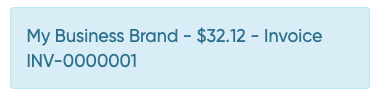
Now, if you want the organisation name to be My Business Brand for all payIDs with domain mybusiness.com then you can send the following request.
POST https://api.azupay.com.au/v1/config/payIdDomains
Authorization: SECR_MYBUSINESSID_myapikey
Content-Type: application/json

[
  {
    "domain": "mybusiness.com",
    "merchantName": "My Business Brand"
  }
]
Now when your payment description will look like this:
Merchant Name not set?If you have a domain configured without
merchantNamethe payID description for that domain will default to the full legal business name used during on-boarding.
Webhooks
We strongly recommend you receive an http call whenever a payment is received and you can do so by passing additional parameters for the endpoint and secret header when creating the PaymentRequest.
POST https://api.azupay.com.au/v1/paymentRequest
Authorization: SECR_MYBUSINESSID_myapikey
Content-Type: application/json{
"PaymentRequest": {
"clientId": "MYBUSINESSID",
...
"paymentNotification": {
"paymentNotificationEndpointUrl": "https://webhooks.azupayexample.com",
"paymentNotificationAuthorizationHeaderValue": "my-secret-header"
}
}
}When the payment is completed, you will receive a request like the following:
POST https://webhooks.azupayexample.com
Authorization: my-secret-header
Content-Type: application/json;charset=utf-8{
"PaymentRequest": {
"clientId": "MYBUSINESSID",
...
},
"PaymentRequestStatus": {
...
"status": "COMPLETE"
}
}The contents of the PaymentRequestStatus and PaymentRequest objects are the same as if you were doing a API call to enquire about the PaymentRequest. Notice that the Authorization header is the one you configured in your initial request.
Authorization header security recommendationGiven your business will probably fulfill a product upon this invocation, for security reasons it is recommended that you use an
Authorizationheader value which is unique per transaction and is a mix of upper and lower alphabetic, numeric and symbol characters.
Now you can use the clientTransactionId or paymentRequestId to match against your records.
Configuring what events to receive via webhookYou can configure which events to receive from the payment lifecycle by going to the Client Dashboard.
Webhooks for Static PaymentRequests
When a customer performs a payment to a Static PaymentRequest, the webhook message will contain a message like the following:
{
    "PaymentRequest": {
        "clientId": "MYBUSINESSID",
        "paymentNotification": {
            "paymentNotificationEndpointUrl": "https://webhooks.azupayexample.com/callback",
            "paymentNotificationAuthorizationHeaderValue": "someSecretAuthValueUniqueToTransaction"
        },
        "payID": "[email protected]",
        "clientTransactionId": "abc123-1234-1234-1234-123456789",
        "paymentAmount": 10,
        "paymentDescription": "A payment to a multipay payment request"
    },
    "PaymentRequestStatus": {
        "nppTransactionId": "AZUPAYNPPTRANSACTIONEXAMPLE12345",
        "payerInformation": {
            "bsb": "123456",
            "fullLegalAccountName": "Azupay Example Pty Ltd",
            "accountNumber": "123456789"
        },
        "payerPaymentReference": "NOTPROVIDED",
        "paymentRequestId": "123456789",
        "createdDateTime": "2025-07-10T04:23:43.444Z",
        "settledBy": "PayID",
        "completedDatetime": "2025-07-10T04:23:43.444Z",
        "parentPaymentRequestId": "987654321",
        "status": "COMPLETE",
        "amountReceived": 10
    }
}
Notice there is a parentPaymentRequestId. This corresponds to the paymentRequestId of the original Static PaymentRequest.
PaymentRequest statuses
The following is a state diagram for our PaymentRequests:
flowchart TB
    Start([Start]) -->|Create PaymentRequest| Waiting((WAITING))

    Waiting -->|Payment received| Complete((COMPLETE))
    Waiting -->|Past paymentExpiryDatetime or superseded by a new PaymentRequest with the same PayID| Expired((EXPIRED))

    Waiting -->|Incorrect payment received| WrongPayment[Funds automatically returned]
    WrongPayment --> Waiting

    Complete -->|Refund or return initiated| ReturnInProgress((RETURN_IN_PROGRESS))
    ReturnInProgress -->|Return completed| ReturnComplete((RETURN_COMPLETE))
    ReturnInProgress -->|Return failed| ReturnFailed((RETURN_FAILED))
    ReturnComplete -.->|Later return rejection or failed return notification| ReturnFailed
    ReturnFailed -->|Retry| ReturnInProgress
| Status | Description | Dynamic PaymentRequest | Static PaymentRequest |
|---|---|---|---|
WAITING | The PayID has been created and is awaiting a payment from your customer. If you created this paymentRequest by setting multiPayment to true then it will remain in WAITING until it's deleted. A Static PaymentRequest in WAITING status will expire at the time specified in the paymentExpiryDatetime field. | Yes | Yes |
COMPLETE | The PayID has been paid. | Yes | No |
RETURN_IN_PROGRESS | A payment was made to this PayID and either it's been rejected because it was the incorrect amount or a refund has been requested via API or our Azupay dashboard and the return payment has not yet been completed. | Yes | No |
RETURN_COMPLETE | A refund or return was processed successfully based on the information available at that time. This status may later change to `RETURN_FAILED` if the return is rejected or fails after completion. | Yes | No |
RETURN_FAILED | A refund or return failed, or a previously completed return was later rejected. The funds may be credited to your balance and the transaction may need reconciliation or follow-up. | Yes | No |
EXPIRED | The payment was not paid and is past its expiry time or it has been superseded by a new PaymentRequest with the same PayID | Yes | No |
Return statuses can change
A RETURN_COMPLETE status means the return has been processed successfully based on the information available at that time. In some cases, this may not be the final outcome.
This can happen when a return is later rejected by the payer's bank.
It can also happen for returns processed via Direct Entry. These returns may initially be marked as RETURN_COMPLETE, but Azupay may receive a failed return outcome up to 5 days later. If this happens, the PaymentRequest may move from RETURN_COMPLETE to RETURN_FAILED, and the returned funds may come back to you.
Important: Do not treat
RETURN_COMPLETEas an irreversible end state for automation.If your system triggers fulfilment, reconciliation, customer notifications, or support workflows when it receives a
RETURN_COMPLETEwebhook, make sure it can also handle a laterRETURN_FAILEDwebhook for the same PaymentRequest.
When viewing the transaction in the Azupay Dashboard, the transaction history shows the current return outcome. If a return moves from RETURN_COMPLETE to RETURN_FAILED, the earlier RETURN_COMPLETE state is overwritten and will not appear as a separate status in the transaction history.
Test Bank
When testing in our sandbox environment, you can finalize payments to a PayID by utilizing our Test Bank utility. This tool replicates the actions your customers would take in their banking app to successfully complete the payment process.
Simply input the PayID or the BSB and Account Number you wish to make a payment to and proceed with the payment transaction.
Pay By Bank
You can integrate with our APIs exclusively to create your own UX or you can embed our recommended Pay By Bank UX. Using our UX ensures optimum user experience for your customers and reduces your development time. For more information, see Pay by Bank UX solution.
Whether you use Pay By Bank UX or you build your own, you will need to understand our PaymentRequest API.
Updated 2 months ago