
Receive PayTo Payments
PayTo payments
Use PayTo payments in the Pay by Bank App when you want customers to authorise payment directly from their bank account.
PayTo supports three main receive-payment patterns:
A single authorised payment collected directly from the customer’s bank account.
An ongoing payment authority for future recurring collections.
An upfront payment collected now, with recurring payments authorised for later.
To use the Pay by Bank app, use the paymentRequest API. Enabling PayTo in Pay by Bank will require additional configurations - please discuss with your implementation manager.
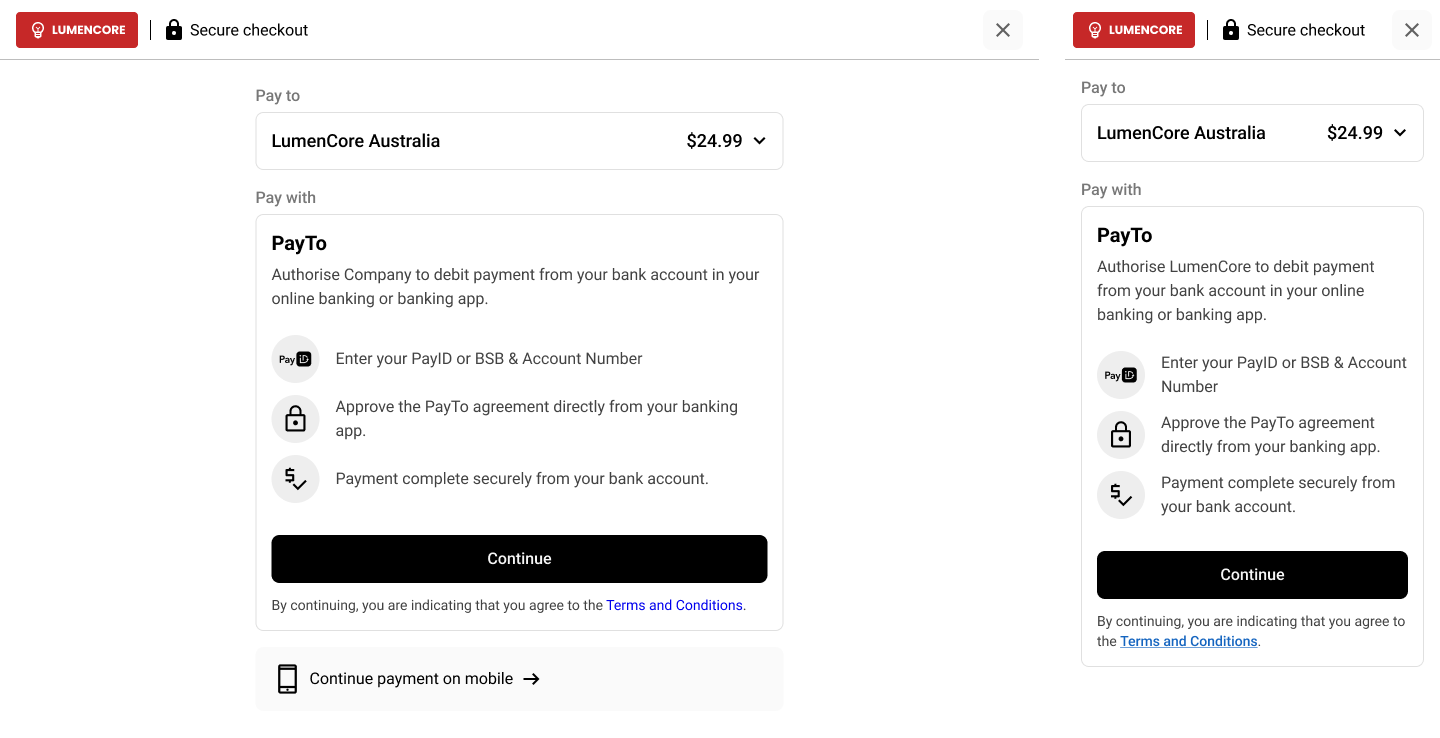
Choose the right PayTo model
| Payment model | Best for | What it does |
|---|---|---|
| Once-off PayTo | Single authorised payments. | Collect one authorised payment from the customer’s bank account. |
| Recurring PayTo | Upfront payment collection, plus a PayTo agreement for future transactions typically used in eCommerce. | Establish an ongoing payment authority for future collections. When paired with Passkeys, allows for low-friction repeat purchases. |
| Pay & Subscribe | Upfront payment collection, plus a PayTo agreement for subscriptions. | Collect an initial payment and set up a recurring subscription. |
How PayTo works
flowchart LR
    A["Customer opens checkoutUrl"] --> B["Selects PayTo"]
    B --> C["Enters PayID or bank details"]
    C --> D["Reviews payment or agreement"]
    D --> E["Authorises in banking app"]
    E --> F["Payment or agreement status updates in checkout"]
Payment patterns
Once-off PayTo
Use Once-off PayTo when you want to collect a single authorised payment from a customer’s bank account.
Best for:
- one-time purchases
- account settlement
- higher-value payments where bank authorisation is preferred
What to expect:
- the customer authorises a single payment
- the payment is approved through their banking environment
- the PayTo agreement for customer authorisation will have ad-hoc as the frequency
- no ongoing payment authority is created
Configure it like this:
- create a paymentRequest
- Set the start date and end dates to the same day
Recurring PayTo
Use Recurring PayTo when you want to establish an ongoing payment authority for future collections from the customer’s bank account.
Best for:
- High repeat service payments, similar to having your payment details on file when paired with Passkeys.
What to expect:
- the customer authorises an ongoing PayTo agreement
- future payments can be collected under that agreement
- the hosted UX supports repeat payment journeys
- where enabled, passkeys can streamline the return payment experience
Configure it like this:
- create a PaymentRequest
- set different agreementStartDate and agreementEndDate values
- set agreementMaximumAmount for future recurring collections
Pay & Subscribe
Use Pay & Subscribe when you want to collect an initial payment now and also establish a recurring PayTo agreement for future payments.
Best for:
- subscription sign-up flows - collect the first months subscription and have the authority set up to collect ongoing future payments.
- memberships with an upfront payment such as a gym joining fee
What to expect:
- the customer completes an upfront payment during checkout
- the customer also authorises an ongoing PayTo agreement
- the flow combines immediate collection such as airline tickets with future recurring membership billing.
Configure it like this:
- set amount for the payment collected immediately. Seperately. set the recurring amount plus the maximum amount for the ongoing PayTo agreement
Recurring PayTo with passkeys
Recurring PayTo can be enabled for your Pay by Bank App configuration if you want customers to approve an ongoing PayTo agreement and then make future payments with a faster return experience.
Once this configuration is enabled, the PayTo agreement created during checkout is recurring in nature rather than a once-off agreement.
What this means
With recurring PayTo enabled:
- the customer completes the initial PayTo agreement setup during checkout
- the agreement remains available for future payments
- when the customer returns to make a subsequent payment, they do not need to approve the payment again in their banking app
- instead, they can use their passkey to complete payment quickly
How passkeys work
Passkeys allow the customer to authenticate using the device and biometric method they already use every day, such as:
- Face ID
- fingerprint
- device PIN
- another supported biometric or device credential
This creates a much faster return payment experience.
What the return payment experience looks like
For a returning customer, the journey is simple:
- Click to pay
- Confirm with their passkey
- Pay
In practice, this means the customer can return and complete a subsequent payment using a quick biometric check, rather than being redirected to approve again in their banking app.
sequenceDiagram
    participant C as Customer
    participant PBB as Pay by Bank App
    participant D as Customer Device

    C->>PBB: Return to make another payment
    PBB->>C: Prompt for passkey sign-in
    C->>D: Confirm with Face ID / biometrics
    D-->>PBB: Passkey authenticated
    PBB-->>C: Payment completed
Subscriptions App vs recurring payments in Pay by Bank
Azupay supports recurring PayTo payments in two different ways:
- Recurring payments in Pay by Bank
- Recurring payments via the Subscriptions App
Both use PayTo, but they are designed for different customer journeys.
| Option | Best for | How it works |
|---|---|---|
| Recurring payments in Pay by Bank | Merchants who want to collect a payment during checkout and support a faster return payment experience later | The customer starts in the Pay by Bank checkout experience, creates a recurring PayTo agreement, and can return to make future payments |
| Subscriptions App | Merchants who want to set up an ongoing recurring payment authority first, then initiate collections against that agreement over time. Note: The Subscriptions App utilises a different underlying API. | The customer completes a dedicated agreement setup flow, and future payments are initiated against the approved agreement |
Use recurring payments in Pay by Bank when
- you want recurring capability built into the checkout experience
- the customer is already in a pay-now flow and you need to collect payment now
- you want to support future return payments with a lower-friction experience
- you may want to support passkeys for subsequent payments
Use the Subscriptions App when
- your primary goal is to set up a recurring PayTo agreement
- you want a dedicated agreement setup journey
- you plan to initiate recurring payments against that agreement over time
- the agreement itself is the main product flow, rather than a checkout payment
The key difference
The main difference is the starting point:
- Pay by Bank recurring payments start from a checkout and payment experience
- Subscriptions App starts from an agreement setup and no payment is collected. Refer to Subscriptions App section.
If you want to collect an upfront payment and also establish a recurring PayTo agreement in the same journey, use the Pay by Bank App rather than the Subscriptions App.
What the customer sees
The hosted Pay by Bank App guides the customer through the full PayTo journey, including:
- entering their payment details
- reviewing the payment or agreement
- authorising in their banking app
- seeing payment or agreement status updates in checkout
Use the checkoutUrl
Once your Payment Request has been created, use the returned checkoutUrl to direct the payer into the hosted Pay by Bank App experience.
The checkout experience will:
- present the payment or agreement details to the payer
- guide them through the PayTo authorisation flow
- support once-off or recurring payment journeys depending on configuration
- reflect the payment or agreement status through the hosted UX
Collecting future payments from an existing PayTo agreement
When a Recurring PayTo or Pay & Subscribe checkout is completed, Azupay sends a PaymentRequest Status Event webhook.
This webhook contains:
- the original
PaymentRequestinformation - the latest
PaymentRequestStatus PaymentRequestStatus.paymentAgreementId, when a PayTo agreement has been created
Store PaymentRequestStatus.paymentAgreementId against the relevant customer, order, account, or subscription record.
{
  "PaymentRequest": {
    "clientTransactionId": "order-12345",
    "paymentAmount": 100.00,
    "paymentDescription": "Initial checkout payment"
  },
  "PaymentRequestStatus": {
    "paymentRequestId": "payment-request-id",
    "status": "COMPLETE",
    "paymentAgreementId": "payment-agreement-id"
  }
}When using the Pay & Subscribe flow, the original paymentRequest can complete, while the PayTo agreement stands separately and can be used for future payments. These future payments are merchant initiated using the payment initiation API.
Choosing the right follow-up flow
| Follow-up flow | Used for | What happens next |
|---|---|---|
| Recurring PayTo with passkeys | Returning customer purchases | The customer returns to your store, starts another checkout (via paymentRequest API), confirms with their passkey, and pays without re-approving in their banking app |
| Pay & Subscribe | Ongoing subscription collections | After the initial payment is collected and PayTo agreement setup, you store the paymentAgreementId and use the Payment Initiation API when future subscription payments are due |
For passkey-enabled return payments, the customer returns to your store and starts another checkout (via paymentRequest API). You do not need to manually call the Payment Initiation API for that return journey.
Returning customer payments with passkeys
For Recurring PayTo with passkeys, future payments are driven by the customer returning to your store.
The customer starts another checkout, opens the Pay by Bank experience, and confirms the payment using their passkey. They do not need to approve the payment again in their banking app.
sequenceDiagram
    participant Customer
    participant Merchant
    participant AzupayAPI
    participant PayByBankApp
    participant Device
    participant Webhook

    Customer->>Merchant: Return to make another purchase
    Merchant->>AzupayAPI: Create paymentRequest
    AzupayAPI-->>Merchant: Return checkoutUrl
    Merchant->>Customer: Redirect to checkoutUrl
    Customer->>PayByBankApp: Open checkout
    PayByBankApp->>Customer: Show returning PayTo payment
    Customer->>Device: Confirm with passkey
    Device-->>PayByBankApp: Passkey authenticated
    PayByBankApp-->>Customer: Show payment complete
    AzupayAPI-->>Webhook: Send PaymentRequest Status Event
Collecting Pay & Subscribe payments
For Pay & Subscribe, future subscription payments are collected using the Payment Initiation API.
Use the paymentAgreementId from the PaymentRequest Status Event webhook when creating a payment initiation.
{
  "PaymentInitiation": {
    "clientId": "your-client-id",
    "clientTransactionId": "your-unique-transaction-id",
    "paymentAmount": "50.00",
    "paymentAgreementId": "payment-agreement-id"
  }
}
After the payment initiation is created, Azupay sends payment status updates through webhook events.
sequenceDiagram
    participant AzupayAPI
    participant Webhook
    participant Merchant

    AzupayAPI-->>Webhook: Send PaymentRequest Status Event
    Webhook-->>Merchant: Store paymentAgreementId
    Merchant->>AzupayAPI: Create PaymentInitiation
    AzupayAPI-->>Merchant: Return PaymentInitiationStatus
    AzupayAPI-->>Webhook: Send PaymentInitiationStatus update
Key points to remember
- Recurring PayTo with passkeys is customer-driven. The customer returns to your store and starts another checkout.
- Pay & Subscribe future collections are merchant-driven. Store
PaymentRequestStatus.paymentAgreementIdwhen it is provided. - Use the Payment Initiation API when future subscription payments are due.
- Only initiate future subscription payments once the agreement is active.
- Use
paymentInitiationfor future Pay & Subscribe collections, not a newpaymentRequest.
Updated 3 months ago